
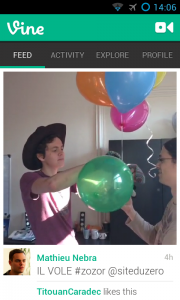
Today, i will introduce you a cool activity transition animation which you could find in the last Vine app available on Android.
To clarify things, some screenshots of this animation.
Screenshots


Animations XML
Opening transition animations.
Translate from right to left animation for the new activity (activity_open_translate.xml)
XML
<?xml version="1.0" encoding="utf-8"?>

<set xmlns:android="https://schemas.android.com/apk/res/android">

    <translate android:fromXDelta="100%"
               android:toXDelta="0%"
               android:duration="@android:integer/config_mediumAnimTime" />

</set>- A simple translate animation from right to left with a duration.****
Scale down animation for the old activity (activity_close_scale.xml)
XML
<?xml version="1.0" encoding="utf-8"?>

<set xmlns:android="https://schemas.android.com/apk/res/android">

    <scale android:fromXScale="100%p"
          android:toXScale="80%p"
          android:fromYScale="100%p"
          android:toYScale="80%p"
          android:pivotX="50%p"
          android:pivotY="50%p"
          android:duration="@android:integer/config_mediumAnimTime" />

    <alpha android:fromAlpha="1"
          android:toAlpha="0.5"
          android:duration="@android:integer/config_mediumAnimTime"/>

</set>- A scale down animation from 100% to 80% with a pivot point from the center of the activity, an alpha opacity to from 1.0 to 0.5 and a duration.
Closing transition animations
Scale up animation for the new activity (activity_open_scale.xml)
XML
<?xml version="1.0" encoding="utf-8"?>

<set xmlns:android="https://schemas.android.com/apk/res/android">

    <scale android:fromXScale="80%p"
          android:toXScale="100%p"
          android:fromYScale="80%p"
          android:toYScale="100%p"
          android:pivotX="50%p"
          android:pivotY="50%p"
          android:duration="@android:integer/config_mediumAnimTime" />

    <alpha android:fromAlpha="0.5"
          android:toAlpha="1.0"
          android:duration="@android:integer/config_mediumAnimTime"/>

</set>- A scale down animation from 80% to 100% with a pivot point from the center of the activity, an alpha opacity to from 0.5 to 1.0 and a duration.
Translate from left to right animation for the old activity (activity_close_translate.xml)
XML
<?xml version="1.0" encoding="utf-8"?>

<set xmlns:android="https://schemas.android.com/apk/res/android">

    <translate android:fromXDelta="0%"
               android:toXDelta="100%"
               android:duration="@android:integer/config_mediumAnimTime" />

</set>- A simple translate animation from left to right with a duration.
Activity integration
In your new activity open :
JAVA
public class AnimatedActivity extends Activity
{
  @Override
  protected void onCreate(Bundle savedInstanceState)
  {
    super.onCreate(savedInstanceState);
    //opening transition animations
    overridePendingTransition(R.anim.activity_open_translate,R.anim.activity_close_scale);
  }

  @Override
  protected void onPause()
  {
    super.onPause();
    //closing transition animations
    overridePendingTransition(R.anim.activity_open_scale,R.anim.activity_close_translate);
  }
}GIST Available
https://gist.github.com/kwent/5875749